Our Blog

How Local Business Owners Are Using Digital Business Cards to Win More Customers
Word of mouth has always been the lifeblood of a local business owner. A recommendation from a neighbour, a referral from a past client, a handshake at a community event these moments build the kind of trust that no ad can buy. But in 2025, the handshake ends with a link, not a paper card. A digital business card is how today's local businesses make sure that warm introduction turns into a paying customer nd how a website builder no coding platform like MobileFirst-Personal makes creating one effortless.
This post shows you exactly how local business owners across the US and Canada are using digital cards to get more calls, more bookings, and more walk-ins.
The Problem With Paper Business Cards for Local Businesses
They Get Lost And They Can't Be Updated
A customer tucks your card in their wallet after a great conversation at a farmers market or a local networking event. Three weeks later, when they're finally ready to call, the card is gone lost between receipts and loyalty cards they'll never use.
Even if they keep it, paper cards are frozen in time. Change your phone number, update your hours, launch a new service? Every card you've already handed out is now wrong. Reprinting costs money and time neither of you has.
A digital business card solves both problems instantly.
They Can't Track Anything
Paper cards give you zero data. You have no idea how many people looked you up after receiving your card, what page they visited, or whether they called. You're operating completely blind.
Digital cards are trackable. You know how many people clicked your link, what they viewed, and whether they took action. For a local business owner making decisions with limited marketing budget, that information is invaluable.
What Makes a Great Local Business Digital Business Card
Your Name, Business, and What You Do In One Line
The first thing someone sees on your card should answer three questions immediately: Who are you? What do you do? Where are you?
"Maria Chen Custom Cake Designer, Vancouver BC" tells a potential customer everything they need in under five seconds. Lead with clarity, not creativity.
MobileFirst-Personal's business card templates are designed around exactly this structure name, role, location, and CTA, laid out for maximum readability on a phone screen.
Your Best Photo and Contact Options
A professional photo even a good phone photo builds immediate personal trust. For a local business owner, especially in service industries like contracting, beauty, or food, a face creates the connection that makes someone choose you over a faceless listing.
Below your photo, give people exactly two or three ways to reach you. Phone, email, and booking link. Nothing more. The goal is one tap to contact not a menu of options to scroll through.
A Direct Link to Your Website or Booking Page
Your digital business card is the bridge between meeting someone and doing business with them. It should lead directly to the next step whether that's your full website, your online booking calendar, or your services menu.
MobileFirst-Personal's Sandbox plan lets you build a free one-page site that works as both your card and your business home page. The Connector Plan adds dedicated business card templates and two additional site slots perfect for keeping your networking card separate from your main business site.
How Local Business Owners Are Using Digital Cards in the Real World
At Community Events and Farmers Markets
Local vendors across the US and Canada have replaced paper card displays with a single laminated QR code on their table. Customers scan it, land on a clean digital card, and tap to order, follow, or book all before they've walked to the next stall.
No card runs out. No card gets wet. No card ends up in a recycling bin.
In Trades and Home Services
Plumbers, electricians, roofers, and landscapers in North America are increasingly sharing a digital card link at the end of every job. The customer already trusts them they're in their home. A professional digital card with a review request link and a referral CTA turns a satisfied customer into an active promoter.
MobileFirst-Personal's card templates include space for a testimonial or review prompt, making this follow-up workflow a one-tap action for the customer.
In Restaurants, Cafes, and Retail
Table cards with QR codes linking to a digital business card containing the menu, hours, social links, and a loyalty program CTA are replacing paper inserts in independent restaurants and cafés across Canada and the US.
For the local business owner managing everything from the kitchen or the floor, a MobileFirst-Personal digital card updates instantly from any device. Change the daily special, update the hours for a holiday, add a new loyalty reward without printing a single thing.
Why MobileFirst-Personal Is the Right Tool for Local Business Owners
No Coding. No Designer. No Developer.
MobileFirst-Personal's website builder no coding interface means any local business owner can build a professional digital card or full website without technical skills. The drag-and-drop editor is intuitive enough to learn in an afternoon.
The AI assistant writes your copy. The templates handle your design. You fill in the details, hit publish, and share your link.
Free Forever With Room to Grow
The Sandbox plan is permanently free and includes free lifetime hosting. For a business owner testing the waters, this is zero-risk. For one who's ready to grow, plans start at just $4/month with the Connector Plan the most affordable dedicated digital business card solution available.
And because MobileFirst-Personal scales all the way to e-commerce and course delivery, you never outgrow the platform.
[Read: Why Your Freelance Website Needs a Blog (And How to Start One With No Coding]
The Business Card That Works While You Work
You're running a business. You're managing staff, handling orders, dealing with suppliers, and serving customers. You don't have time to follow up with every person you meet.
Your digital business card does that follow-up for you. It's live 24 hours a day, it's always up to date, and it turns casual conversations into confirmed customers without you lifting a finger after you share the link.
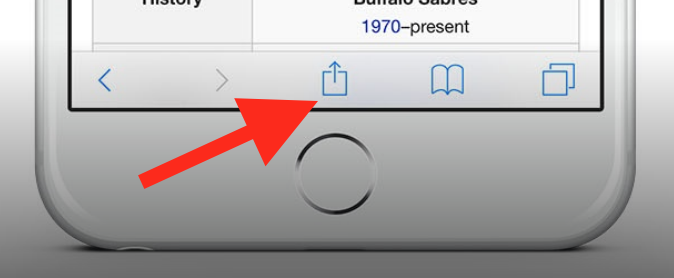
To add this web app to your homescreen, click on the "Share" icon
Then click on "Add to Home"
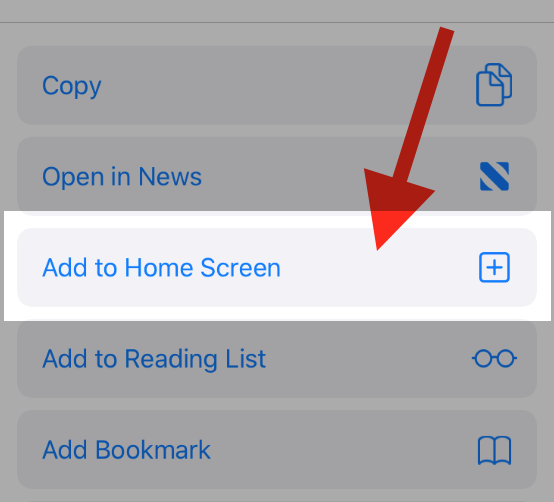
To add this web app to your homescreen, click on the "Share" icon
Then click on "Add to Home"
It looks like your browser doesn't natively support "Add To Homescreen", or you have disabled it (or maybe you have already added this web app to your applications?)
In any case, please check your browser options and information, thanks!
It looks like your browser doesn't natively support "Add To Homescreen", or you have disabled it (or maybe you have already added this web app to your applications?)
In any case, please check your browser options and information, thanks!